
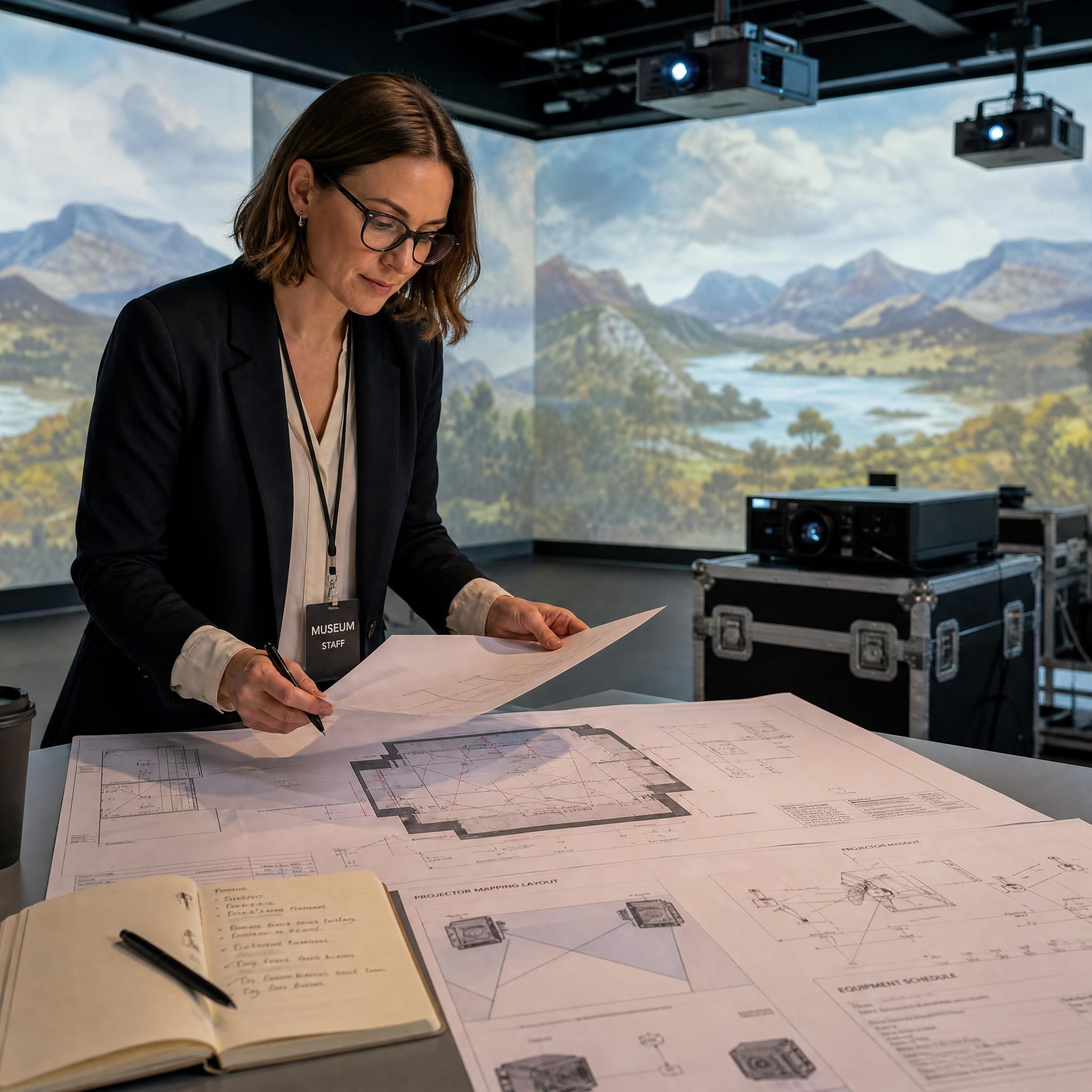
Your exhibition narrative is ready. Your budget is approved. Your team is excited. And then comes the question nobody warned you about: how exactly do you turn a blank gallery space into a fully functioning immersive room without losing six months, blowing your contingency, and alienating your conservators?
The gap between "we want an interactive screen" and "our visitors are genuinely wowed" is where most museum technology projects stall. It's not a lack of ambition — it's a lack of a clear, field-tested process. This guide fills that gap. Whether you're deploying a single interactive screen in a heritage gallery, commissioning a full immersive wall for a flagship exhibition, or building a permanent immersive room from scratch, the following steps, checklists, and real-world examples will get you there.
Table of contents
- Step 1: Start with the Visitor Experience, Not the Technology
- Step 2: Choose the Right Technology for Your Space and Budget
- Step 3: Plan Your Installation — The Technical Checklist
- Step 4: Build Accessibility In From Day One
- Step 5: Content Is Not an Afterthought
- Step 6: Measure What Matters — ROI and Impact Metrics
- Real-World Case Study: The Bermeo Museum
- Your Pre-Launch Checklist
- FAQ
- Key Statistics
Step 1: start with the visitor experience, not the technology
The most expensive mistake in museum tech projects is choosing a format before defining a purpose. An interactive screen is not a goal — it's a tool. The question to answer first is: what should a visitor feel, understand, or do differently because of this installation?
Museums have long been places of discovery, preservation, and storytelling — but interactive displays are not new; what's evolving fast is the way technology transforms them. The shift from passive observation to active participation is the real design brief.
Before you write a single technical specification, answer these four questions:
- What story does this technology serve? A projection wall that dazzles but has no narrative connection to the collection is a distraction, not an asset.
- Who is your primary visitor segment? Families with young children need different interaction models than specialist researchers or school groups.
- How long should the experience last? A 90-second interactive kiosk and a 20-minute immersive room require completely different content architecture.
- What happens after the visit? Museums now design exhibits for shareability, extending reach far beyond physical walls — consider how your installation will live on social media and in visitors' memories.
Practical tip: Run a "visitor journey mapping" workshop before briefing any vendor. Map the emotional arc — curiosity → engagement → understanding → inspiration — and then ask which technology supports each stage. This document becomes the creative brief that keeps the project on track.
Step 2: choose the right technology for your space and budget
The three main formats — interactive screen, immersive wall, and immersive room — are not interchangeable. Each has a distinct use case, cost profile, and operational footprint.
Interactive screens: the versatile workhorse
Interactive screens (touchscreens, multi-touch tables, gesture-activated panels) are ideal for:
- Well-lit galleries where projection would wash out
- High-throughput areas requiring short, self-guided interactions
- Collections with deep archival content to surface
Commercial-grade LCD panels are designed for 24/7 operation with extended warranties — higher upfront cost than consumer displays, but rated for 50,000+ hours and including features like auto-restart after power loss. For museums running seven days a week, this distinction is non-negotiable.
Software platforms matter as much as hardware. Web-based platforms (using WebGL — the browser technology that renders 3D graphics without additional plugins — or WebGPU) run on standard hardware without proprietary software and updates deploy instantly, making them a default choice for projects that need to reduce long-term maintenance burden and avoid vendor lock-in. Native applications built in Unity or Unreal Engine (professional game engines repurposed for interactive exhibits) offer a higher performance ceiling for complex visuals or real-time physics, and are common in immersive rooms and high-fidelity simulations.
Immersive walls: maximum impact, contained footprint
An immersive wall — typically a large-format LED video wall or a projection surface spanning one or more gallery walls — delivers theatrical impact without requiring a dedicated room. LED video walls offer seamless large-scale displays without bezels, with modular tiles that allow partial replacement if damaged — higher cost per square meter, but increasingly common for signature installations.
The rule of thumb: use displays for touch-primary experiences in well-lit spaces; use projection for immersive environments, unusual surfaces, or when you need to minimize visible technology.
Immersive rooms: the full sensory environment
An immersive room — a fully enclosed space where projection mapping covers walls, floor, and ceiling — is the most technically demanding and emotionally powerful format. Successful design begins with a rigorous assessment of the physical space, prioritizing light control and surface geometry over pure square footage. A smaller, perfectly controlled room often yields a better experience than a large, uncontrolled hall.
| Format | Ideal Use Case | Typical Budget Range | Technical Complexity |
|---|---|---|---|
| Interactive Screen | Archival exploration, timelines, wayfinding | €5,000–€50,000 | Low–Medium |
| Immersive Wall | Signature gallery moment, narrative backdrop | €30,000–€200,000 | Medium |
| Immersive Room | Flagship experience, full sensory storytelling | €80,000–€500,000+ | High |
| Projection Mapping (object) | Heritage artifacts, 3D models | €20,000–€150,000 | Medium–High |
📊 $8.05 billion in 2026, growing to $19.83 billion by 2031 – Projection Mapping Market
Step 3: plan your installation — the technical checklist
This is where projects most commonly go wrong. Technical requirements for immersive technology are non-negotiable — you cannot retrofit a room that wasn't designed for it.
For immersive rooms and projection walls
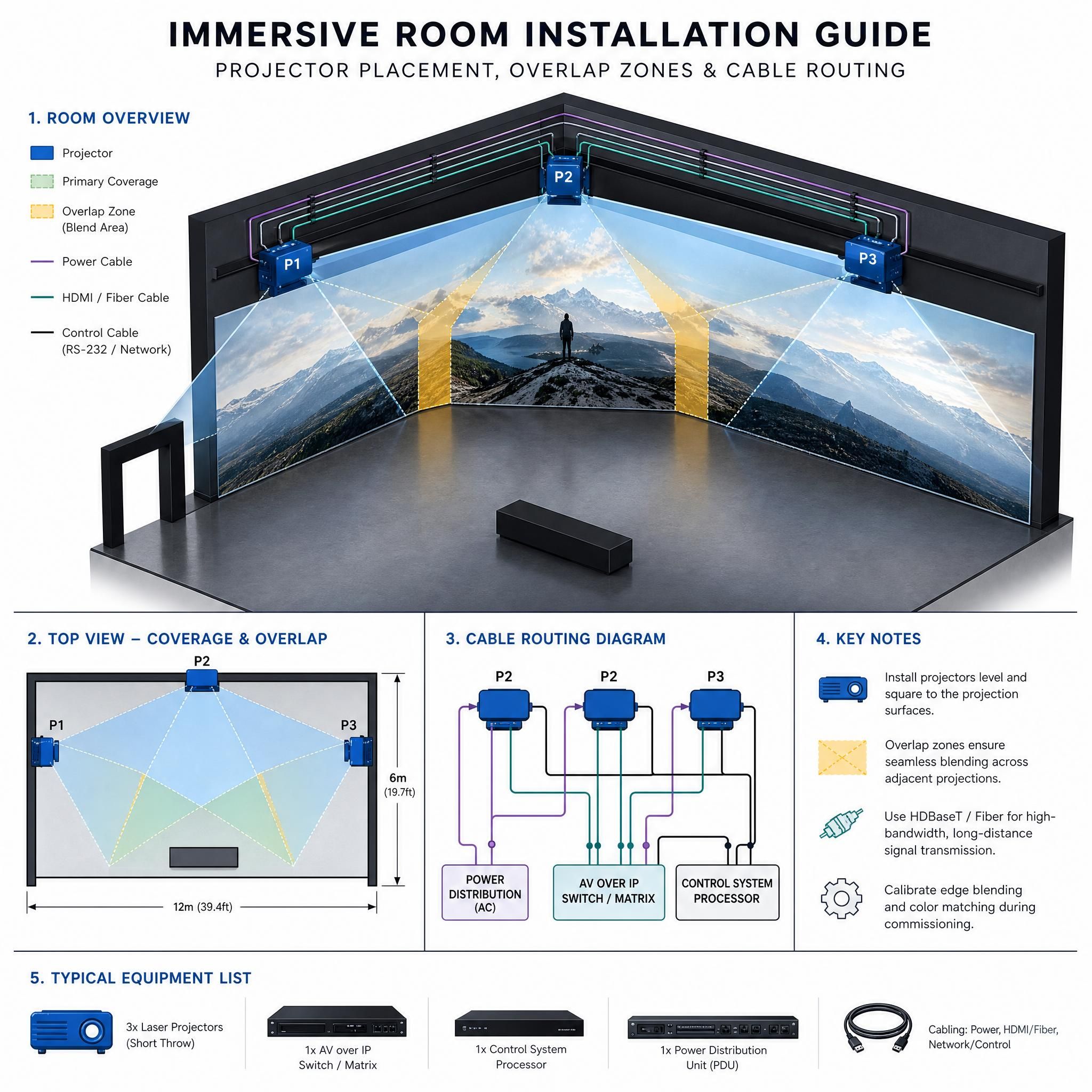
The physics of light dictate your design. Ambient light is the enemy of projection — total blackout capability is non-negotiable. Ceiling height determines your lens throw ratio: if ceilings are too low, users will cast large shadows on the walls. The design phase checklist includes: (1) verifying room dimensions and ceiling height (minimum 10 feet recommended for 360-degree setups); (2) installing blackout curtains or permanent window plugs to ensure zero ambient light; (3) ensuring walls are perfectly flat, since even minor textures will distort the projected image; (4) mapping out projector placement diagrams to calculate overlap zones (typically 15–20%); and (5) ensuring HVAC systems can cycle air without adding noise, as projectors generate significant heat.
Calibration: the step that makes or breaks the experience
Once hardware is physically secure, software calibration begins. This process — known as warping and blending — takes separate video outputs and stitches them into a single, continuous canvas, and is what allows 360-degree projection technology to function correctly. The step-by-step installation process includes: running high-bandwidth video cables (fiber optic for long runs) before closing walls; using grid patterns to warp the image so straight lines remain straight on corners; softening the edges where projector beams overlap to eliminate bright bands; and calibrating all projectors to the exact same color temperature and brightness levels.
Project timeline: what to expect
A typical immersive installation project runs 6–10 months from initial brief to final activation. Here is a realistic breakdown:
| Phase | Duration | Key Deliverables |
|---|---|---|
| Concept & Alignment | 2–4 weeks | Creative brief, site assessment, concept directions |
| Design Development | 4–8 weeks | Technical specs, content architecture, spatial design |
| Fabrication & Build | 6–12 weeks | Hardware sourcing, custom fabrication, testing |
| Installation & Activation | 1–3 weeks | Calibration, system testing, staff training |
Warning: Budget a 15–20% contingency for technical surprises. Structural surprises (unexpected wall materials, hidden cables, HVAC conflicts) are the most common cause of cost overruns.
Step 4: build accessibility in from day one
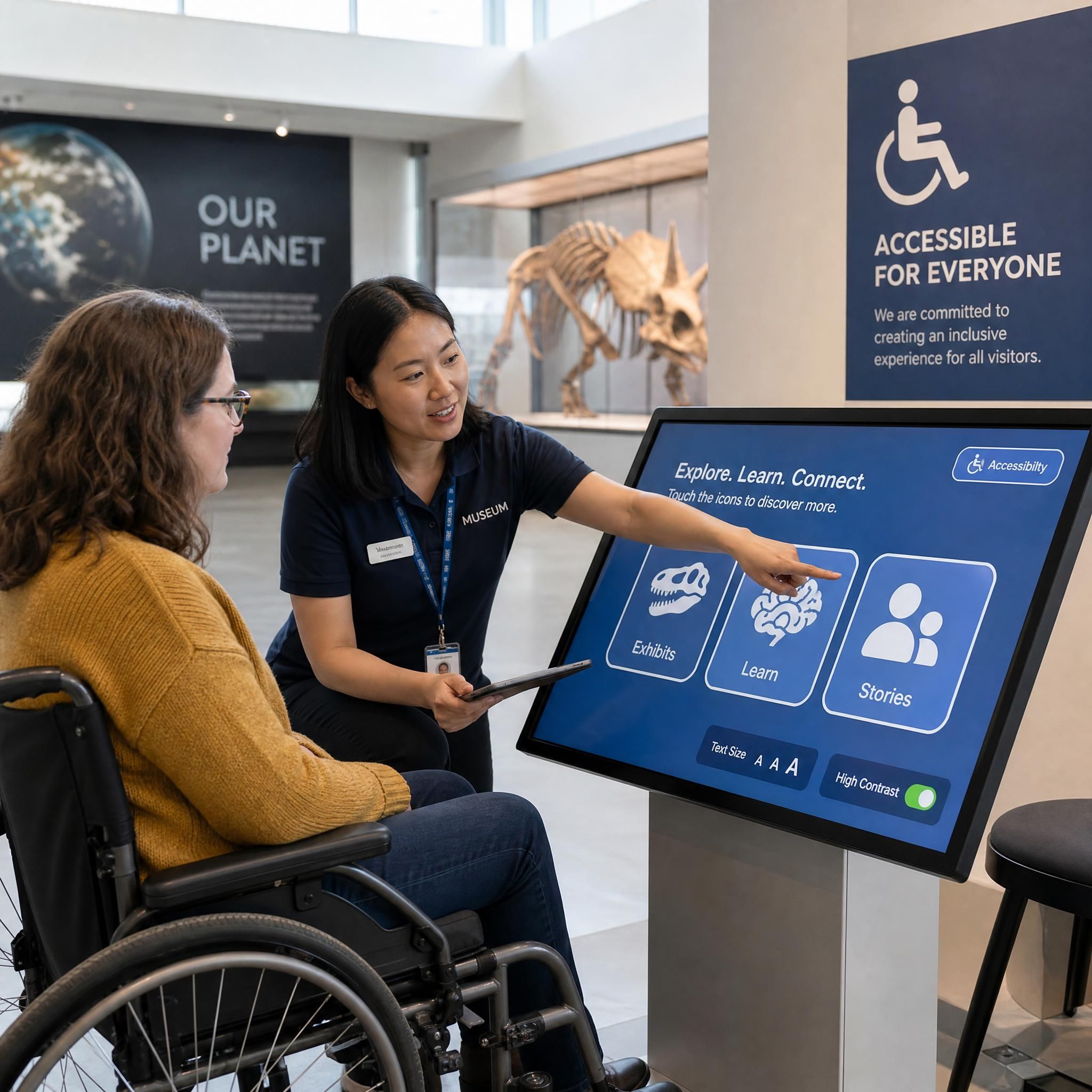
Accessibility is not a compliance checkbox — it is a strategic audience expansion tool. Accessibility ensures that immersive technologies serve every visitor, regardless of ability; inclusive design expands audience reach, supports EU cultural funding priorities, and strengthens a museum's public mission to connect people with heritage.
The four accessibility dimensions to address
1. Physical access
Interactive screens must comply with reach-range standards for wheelchair users. Controls such as levers, buttons, and track balls must be located so they are within reach range of people who are short or those who use wheelchairs as well as of those who are standing.
2. Sensory access
Instructions for interactives must be accessible to all visitors — presented in both audio and printed format, since people who are blind and those who cannot read need instructions presented orally, while those who are deaf or hard of hearing require the instructions in print.
3. Cognitive and neurodiverse access
Museums using AR smart glasses that overlay interactive educational content directly onto physical exhibits can simplify complex information and make it accessible for visitors with diverse cognitive capabilities, significantly enriching visitor experiences and forging deeper emotional and cognitive connections to art and cultural heritage. For immersive rooms, offer "low-stimulus" sessions with reduced sound levels and softer lighting transitions for visitors with sensory sensitivities.
4. Language access
Multilingual content is increasingly standard. The Bermeo Museum case study (below) shows how four-language support can be built into the core content architecture from the start.
📊 Museums with inclusive design report up to 20% broader audience reach – Accessibility ROI
Step 5: content is not an afterthought
The most technically perfect immersive room will fail if the content is weak. The key is ensuring technology enhances the story rather than distracting from it.
Content architecture principles
Layer your content for different visit lengths. Design a "30-second read" (ambient visual), a "3-minute engage" (interactive layer), and a "10-minute deep dive" (optional extended content). This serves casual visitors and specialists alike without forcing either group through a linear experience.
Design for emotion, not information. Facts inform, but emotions transform. The most memorable exhibits are designed for feelings as much as learning — color, lighting, pacing, and content all contribute to emotional impact, and the best designs orchestrate these emotional notes intentionally, creating experiences that resonate long after the visit ends.
Plan for content updates. Interactives can be modular so content rotates seasonally without new fabrication. Build this into your contract with vendors — a system that requires a specialist to update content every six months will cost you more in the long run than a slightly more expensive platform with a simple CMS.
AI-powered content: the 2026 opportunity
Museums are shifting from "holders of objects" to "platforms for stories" because audiences, especially younger, mobile-first visitors, expect personalized, interactive journeys instead of static labels and linear tours. In 2026, AI-driven recommendation engines can adapt interactive screen content to visitor behavior in real time — surfacing deeper archival content for engaged visitors, simplifying for younger audiences. This is no longer experimental: the Museu do Amanhã in Rio de Janeiro successfully launched IRIS, a digital assistant operated through a chipped card that gathered visitors' personal data and personalized their experience as they toured the main exhibit.
Microsoft's Storycaster system, presented at CHI 2026, demonstrates a new frontier: AI systems capable of generating adaptive narratives for immersive room-based storytelling, adjusting the story arc based on audience responses in real time.
Step 6: measure what matters — ROI and impact metrics
Every technology investment needs a justification framework. Define your KPIs before installation, not after.
The three tiers of museum tech ROI
Tier 1 — Engagement metrics (operational)
- Average dwell time per installation
- Interaction rate (% of visitors who engage vs. pass by)
- Session depth (how many layers/pages visited)
Tier 2 — Institutional metrics (strategic)
- Ticket revenue per visitor (do immersive rooms justify premium pricing?)
- Repeat visit rate (do visitors come back?)
- Net Promoter Score and social media mentions
Tier 3 — Mission metrics (impact)
- Educational outcomes (pre/post quiz scores for school groups)
- Accessibility reach (% of visitors with disabilities served)
- Collection discovery (are underexhibited works being found through interactive screens?)
Cultural and heritage sites are forecast to expand their projection mapping deployments at a 20.92% CAGR, as UNESCO endorses projection mapping for after-dark storytelling without permanent modifications — and Casa Batlló's 110,000 paid visitors to its evening show validated willingness to pay for curated heritage experiences.
📊 Interactive installations growing at 13.4% CAGR 2026–2034 – Immersive Exhibition Market
Practical tip: Install visitor analytics from day one. Anonymous foot-traffic sensors and interaction logging (privacy-compliant, no personal data) give you the data to optimize content, justify renewals, and apply for grants.
Real-world case study: the bermeo museum
Telefónica Tech acted as technology integrator in the development of a new museum space promoted by Bermeo Town Council, designed to preserve and promote the culture, traditions, and main tourist attractions of the Basque fishing village. Telefónica was responsible for the technological integration of the space, providing connectivity, equipment — touchscreens, laser projectors, multimedia players, dedicated PCs and audio systems — and the development of the digital content that shapes the visitor experience.
The museum features an interactive timeline called "Kings, pirates, pilgrims and influencers" that allows visitors to explore the historical milestones of Bermeo through images and short stories in Basque, Spanish, English, and French. The flagship immersive experience, "241 steps," shows a 360° virtual tour of the climb to San Juan de Gaztelugatxe, combining free navigation, touch interaction, narrative audio, and ambient sound.
The project was designed under criteria of accessibility, with multilingual content, subtitling, and adapted audio systems, facilitating access to a diverse public.
What makes Bermeo a model project:
- Technology was selected after defining the cultural narrative
- Accessibility was designed in from the architecture phase, not retrofitted
- The content mix balances short interactive touchpoints (timeline) with a deep immersive experience (360° room)
- A single integrator managed connectivity, hardware, and content — reducing coordination risk
Your pre-launch checklist
Use this checklist in the final two weeks before opening:
Technical
- All projectors/screens calibrated and color-matched
- Auto-restart protocols tested after simulated power loss
- Backup content loaded for primary system failure scenarios
- HVAC confirmed at operating temperature with all hardware running
- Cable management complete, no tripping hazards
Content
- All language versions reviewed by native speakers
- Audio description tracks recorded and tested
- Content update process documented and tested by non-technical staff
- Seasonal content rotation scheduled for next 12 months
Accessibility
- Reach-range compliance verified for all interactive touchpoints
- Audio and print instructions available at every interactive station
- Low-stimulus session schedule published
- Staff trained on accessibility features and visitor support protocols
Operations
- Daily opening checklist created (5–10 minutes per station)
- Vendor support contacts and SLA documented
- Visitor analytics baseline established
- Staff trained on first-level troubleshooting
Questions fréquentes (FAQ)
How long does it take to plan and install an immersive room in a museum?
A typical immersive installation project runs 6–10 months from initial brief to final activation. This includes concept and alignment (2–4 weeks), design development (4–8 weeks), fabrication and build (6–12 weeks), and installation and activation (1–3 weeks). Factors that extend the timeline include custom fabrication, complex site conditions, and stakeholder alignment requirements. Plan for a minimum of 6 months even for a focused, single-room project.
What is the difference between an interactive screen and an immersive wall?
An interactive screen is a display — typically a touchscreen or multi-touch table — designed for direct physical interaction by individual visitors or small groups. An immersive wall is a large-format projection or LED surface designed to envelop visitors in a visual environment, often without requiring direct touch. The practical rule: use displays for touch-primary experiences in well-lit spaces, and use projection for immersive environments, unusual surfaces, or when you need to minimize visible technology.
How much does an interactive museum installation cost?
Costs vary enormously by format and complexity. A single commercial-grade interactive touchscreen station starts at around €5,000–€15,000 for hardware. A full immersive room with projection mapping, spatial audio, and custom content typically runs €80,000–€500,000+. The most important cost variable is content — budget at least 40% of your total project cost for content design, development, and first-year updates.
How do i make an immersive room accessible to visitors with disabilities?
Accessibility must be designed in from the start, not retrofitted. Key measures include: physical reach-range compliance for all interactive elements, audio description tracks for visual content, printed instructions alongside audio prompts, multilingual interfaces, and dedicated low-stimulus sessions with reduced sound and softer lighting for visitors with sensory sensitivities. Accessibility-by-design also unlocks EU cultural funding programs that specifically prioritize inclusive digital projects.
What software platform should i choose for my interactive exhibits?
The choice depends on your technical capacity and long-term maintenance model. Web-based platforms (WebGL/WebGPU) run on standard hardware without proprietary software, with updates that deploy instantly — the default choice for most projects because they reduce long-term maintenance burden and avoid vendor lock-in. For high-performance immersive rooms requiring real-time physics or complex 3D environments, Unity or Unreal Engine offer greater power but require specialist technical support. Always negotiate content update rights and source code access in your vendor contract.
Chiffres clés
📊 $8.05 billion — global projection mapping market in 2026, growing at 19.76% CAGR through 2031 (Source: Mordor Intelligence)
💡 13.4% CAGR — growth rate of interactive installations in museums and cultural venues, 2026–2034 (Source: DataIntelo)
🏛️ 6–10 months — typical timeline from brief to activation for a full immersive installation (Source: Haiiileen Commission Guide 2026)
🎯 38.6% — share of the immersive art exhibition market held by projection mapping technology in 2025, making it the dominant format (Source: DataIntelo)
Conclusion: technology serves the story
The museums getting the most from their immersive investments in 2026 share one trait: they treat technology as a storytelling medium, not a statement of modernity. An interactive screen that unlocks 6,000 artifacts from a regional collection. An immersive wall that puts visitors inside a 360° landscape they could never otherwise reach. An immersive room that makes a local fishing village's history feel universal.
None of these work without a clear visitor experience brief, a technically rigorous installation process, accessibility designed in from the start, and a content strategy built for the long term.
The checklist in this guide is your starting point. The next step is yours — whether that's a focused pilot in one gallery, a brief to your first vendor, or a conversation with your team about which story deserves to be told immersively.
Ready to take the next step? Contact our team for a site assessment and a tailored recommendation for your space, budget, and collection. We work with museum professionals at every stage — from initial concept to post-launch optimization.
This article is part of a series on immersive museum technology. Explore related guides: [LED vs. Projection Mapping: Which Device for Your Exhibition?] — [Immersive Wall: 5 Installations That Transformed the Visitor Experience] — [ROI of Immersive Technologies in Museums: What the Numbers Say]